
Sequence Memory
Game
This project is a sequence memory game built with an Arduino Uno. The player must watch a sequence of LEDs lighting up, then repeat it by pressing the corresponding buttons in the same order. If the player inputs the correct sequence, the game moves to the next round with an extended pattern. A mistake resets the game back to the beginning. This game is a fun way to practice programming logic, input/output handling, and randomisation with Arduino.
How It Works
The game uses a set of LEDs and push buttons. Each LED corresponds to one button. At the start of each round, the Arduino flashes a sequence of LEDs (in random order) and waits for the user to replicate it by pressing the matching buttons. The sequence gets longer with each round. If the player inputs the wrong button, a buzzer sounds and the game resets. The longer you go, the more you must remember.
Materials
To build a Sequence Memory Game project with an Arduino Uno, you'll need the following materials:
Components:
1) Arduino Uno
-
Runs the game logic and handles input and output
2) 4 LEDs (Red, Green, Blue, Yellow)
-
Show the flash sequence to the player
3) resistors (220Ω)
-
Limit current to each LED to prevent damage
4) 4 push buttons
-
Allow player input
5) 1 passive piezo buzzer
-
Plays sound feedback for actions and errors
6)Breadboard and jumper wires
-
Connect components to the Arduino
7) USB Cable (Type-A to Type-B)
-
To connect Arduino to a computer for programming and power.
Basic Setup


1) LED connections:
-
Red LED:
-
Short Leg (-) → GND through a 220Ω resistor
-
Long Leg (+) → Pin 4
-
-
Green LED:
-
Short Leg (-) → GND through a 220Ω resistor
-
Long Leg (+) → Pin 5
-
-
Blue LED:
-
Short Leg (-) → GND through a 220Ω resistor
-
Long Leg (+) → Pin 6
-
-
Yellow LED:
-
Short Leg (-) → GND through a 220Ω resistor
-
Long Leg (+) → Pin 7
-
2) Button connections:
-
Red button → One side to digital pin 8, other side to GND
-
Green button → One side to digital pin 9, other side to GND
-
Blue button → One side to digital pin 10, other side to GND
-
Yellow button → One side to digital pin 11, other side to GND
Note: No external resistors are needed. Each button pin will be configured as INPUT and checked for LOW → HIGH change to detect a press.
Buzzer connection:
-
Buzzer → Connect positive leg to pin 3, negative leg to GND
-
Power (+) → 5V
-
Signal (S) → Pin 3
-
Ground (-) → GND
-
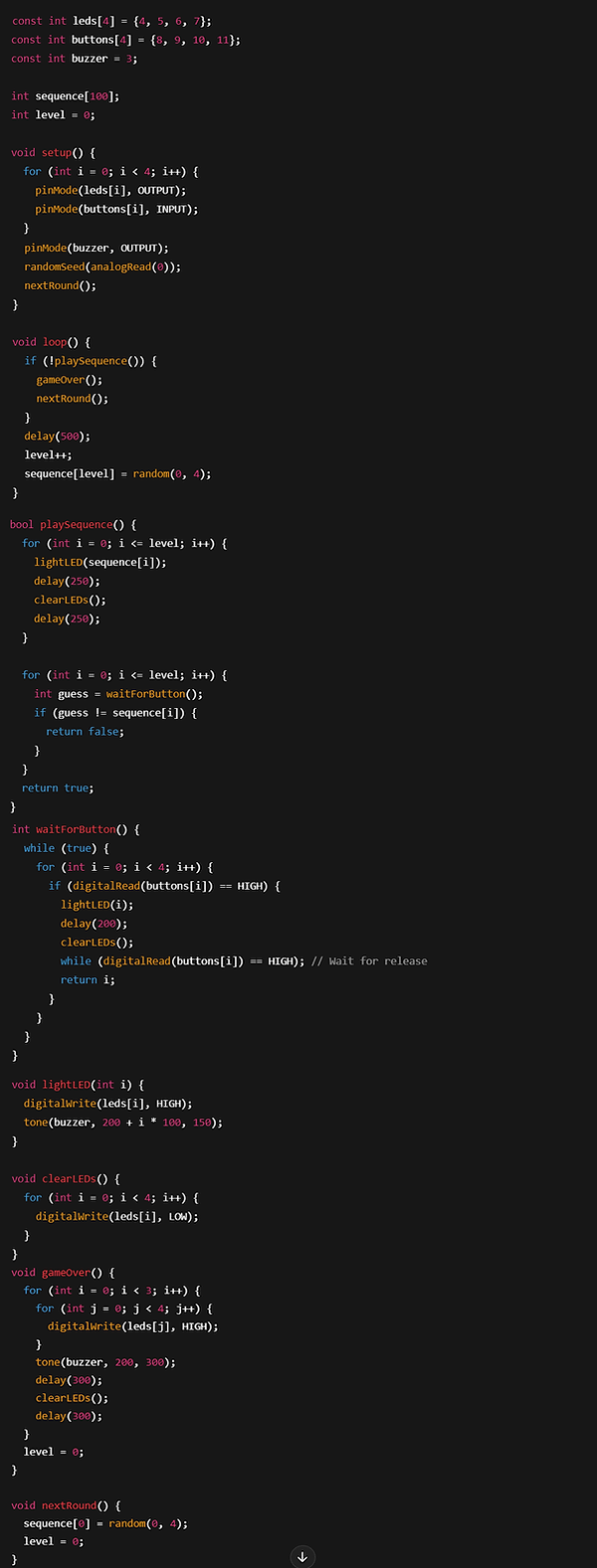
CODE BREAK-DOWN
const int leds[4] = {4, 5, 6, 7};
-
Defines an array containing the digital pin numbers for the 4 LEDs. Each index corresponds to one LED.
const int buttons[4] = {8, 9, 10, 11};
-
Defines an array with the pin numbers for the 4 buttons, each paired with an LED by index.
const int buzzer = 3;
-
Assigns pin 3 to the buzzer. This will be used to output tones during the game.
int sequence[100];
-
Creates an array to store up to 100 values representing the LED sequence the player must remember.
int level = 0;
-
Keeps track of the current game level (or sequence length). Starts at 0 and increases as the player succeeds.
void setup() {
-
Starts the setup section, which runs once when the Arduino powers on or resets.
for (int i = 0; i < 4; i++) { pinMode(leds[i], OUTPUT); pinMode(buttons[i], INPUT); }
-
Loops through all 4 LEDs and buttons, setting the LED pins as OUTPUT and button pins as INPUT (for reading presses).
pinMode(buzzer, OUTPUT);
-
Sets the buzzer pin as an output so tones can be played.
randomSeed(analogRead(0));
Seeds the random number generator using noise from analog pin 0 for better randomness.
nextRound();
-
Calls the function to start the first round and generate the first LED in the sequence.
void loop() {
-
Begins the main game loop, which runs continuously.
if (!playSequence()) { gameOver(); nextRound(); }
-
Plays the current sequence. If the player gets it wrong, the game over sequence plays and a new game starts.
delay(500);
-
Pauses for half a second between rounds.
level++;
-
Increases the level after a successful round.
sequence[level] = random(0, 4);
-
Adds a new random LED to the sequence, choosing a number from 0 to 3 (representing the 4 LEDs).
bool playSequence() {
-
Starts a function that plays the sequence and checks player input.
for (int i = 0; i <= level; i++) { lightLED(sequence[i]); delay(250); clearLEDs(); delay(250); }
-
Loops through the sequence, lights each LED briefly, and clears it to show the pattern to the player.
for (int i = 0; i <= level; i++) { int guess = waitForButton(); if (guess != sequence[i]) { return false; } }
-
Waits for player input, one button at a time. If any input doesn’t match the stored sequence, the function returns false (indicating a mistake).
return true;
-
If the player completed the whole sequence correctly, return true.
int waitForButton() {
-
Starts a function that waits until one of the buttons is pressed.
while (true) { for (int i = 0; i < 4; i++) { if (digitalRead(buttons[i]) == HIGH) {
-
Loops forever until any one of the 4 buttons reads HIGH (pressed).
lightLED(i); delay(200); clearLEDs();
-
Lights the matching LED for feedback and clears it shortly after.
while (digitalRead(buttons[i]) == HIGH);
-
Waits until the player releases the button (prevents multiple counts from one press).
return i;
-
Returns the index of the button that was pressed.
void lightLED(int i) {
-
Lights up the LED at index i and plays a tone based on its index.
digitalWrite(leds[i], HIGH);
-
Turns on the selected LED.
tone(buzzer, 200 + i * 100, 150);
-
Plays a short tone using the buzzer. The frequency depends on which LED is lit.
void clearLEDs() {
-
Turns off all the LEDs.
for (int i = 0; i < 4; i++) { digitalWrite(leds[i], LOW); }
-
Loops through all LED pins and turns them off.
void gameOver() {
-
Plays a game over pattern of lights and sound.
for (int i = 0; i < 3; i++) { for (int j = 0; j < 4; j++) { digitalWrite(leds[j], HIGH); }
-
Flashes all LEDs on.
tone(buzzer, 200, 300); delay(300); clearLEDs(); delay(300); }
-
Plays a low tone, waits, turns off LEDs, and pauses briefly — repeated 3 times.
level = 0;
-
Resets the level to start a new game.
void nextRound() {
-
Prepares for the next game session or restarts the first round.
sequence[0] = random(0, 4);
-
Creates the first item in the new LED sequence.
level = 0;
-
Sets the level back to zero.